To buy USDT on Binance, choose USDT in Buy Crypto and use a payment method available to your account. If you already hold another cryptocurrency on Binance, use Convert or a suitable Spot pair. P2P is another route when you want to pay a seller through an available local payment method.
This guide covers Binance.com, which has different accounts and services from Binance.US. Complete identity verification and the security checks requested in your account before starting.
In the European Economic Area, check this first: Binance removed USDT Spot pairs for EEA users from 31 March 2025. Its current linked notice preserves deposits, withdrawals and custody, plus selling remaining USDT through Convert. That does not make Convert a route to buy restricted USDT. If a USDT purchase is unavailable in your account, stop that route. If your actual goal is to fund another trade, an available USDC or EUR pair may meet it without buying USDT.
Choose the route for the funds you have
| Your starting point | Route | What to compare before confirming |
|---|---|---|
| Money on an eligible card | Buy Crypto → USDT → Card | Total card charge, USDT received and any bank charges |
| Money you can deposit through a supported bank channel | Deposit fiat, then use an available balance purchase or conversion | Deposit costs, credited currency and the separate USDT quote |
| A supported crypto balance on Binance | Convert, or Spot if you want order control | Final USDT amount; Convert and Spot quotes can differ |
| An available local payment method on P2P | Buy USDT from an advertiser | Seller price, order limits, fees and payment terms |
Buying USDT on the exchange does not require choosing TRC20, ERC20 or another blockchain. That choice belongs to a crypto deposit or withdrawal.
Buy USDT with a card or deposited money
- Open Buy Crypto. Select USDT, your payment currency and the amount you want to spend.
- Choose Card if it is offered. Add your own eligible card or select one already saved.
- Review the amount charged, USDT you will receive and displayed fees. Confirm the current quote; request a new one if it expires.
- Complete your bank's authorization if requested.
- Open the purchase history and confirm that the order succeeded. Then check the USDT quantity in Assets → Overview.
These are the steps in Binance's website card guide. A supported card brand alone does not guarantee acceptance: the issuing bank, payment currency, country and account eligibility can affect the transaction.
For bank Periodic payments between buyers and sellers of perpetual futures. Buyers pay when the rate is positive; sellers pay when it is negative. This mechanism keeps the contract price closer to the underlying asset price., open Deposit → Bank Deposit, select a method actually shown to you and follow that deposit's instructions. Wait for the fiat balance to arrive, then select an available USDT purchase using that balance. A bank deposit funds your account; it does not itself buy USDT. Binance's deposit guide confirms that currencies and bank channels vary by country.
If a card payment fails, check History → Fiat Order for the failure reason before paying again. Contact the bank for an issuer decline, or use the order's support option if money was debited without a successful purchase. A bank debit and a completed Binance order are different statuses.
Buy USDT through P2P
On P2P, you pay another user outside Binance using the payment details in a Binance order. Binance reserves the seller's crypto while the order is active.
- Open Trade → P2P, select Buy, then USDT, your fiat currency and payment method.
- Choose an advertisement whose minimum, maximum and available quantity fit your purchase. Read the seller's conditions before creating the order.
- Enter the amount and create the order. Use the payment details shown inside it.
- Pay from an account in your own verified name. Check that the recipient's account name matches the seller's verified name. Do not pay a third party or move the transaction into a messenger.
- After completing payment, select Transferred, Notify Seller.
- Wait for release, then select View my balance and check the USDT amount.
These steps follow Binance's P2P purchase guide and transaction policy. If you have paid but the seller has not released the crypto within the order's time frame, use the order chat and then Appeal, keeping your payment evidence. Do not cancel a paid order unless the payment has actually been refunded.
P2P is not universally free. Binance says fees can apply to makers and takers, depending on the market; the payment provider may charge separately. A low displayed USDT price is only one part of the cost.
Exchange an existing crypto balance for USDT
For a single conversion, open Trade → Convert & Block Trade → Instant. Set From to the asset you own and To to USDT, enter the amount, preview the quote and confirm before it expires. Check Orders → Convert History and the resulting USDT balance.
Binance's Convert FAQ says no additional trading fee is charged beyond the quote. The quoted price can still differ from Spot, so compare the amount of USDT received rather than a “zero fee” label. Minimum and maximum amounts depend on the selected pair.
On Spot, the button depends on the pair's direction. For example, USDC/USDT prices USDC in USDT. To exchange your USDC for USDT, choose Sell USDC. Choosing Buy USDC would do the opposite. The same principle applies when selling BTC for USDT on BTC/USDT.
On USDC/USDT, select Spot → Sell and choose Market for execution against available orders or Limit for a specified price. Enter the amount of USDC you want to exchange; for Limit, also enter the price in USDT per USDC. Check that the order meets the displayed minimum and does not exceed your available USDC, review the direction, then confirm Sell USDC.
A limit order can remain open. Check Trade History for executed trades and Open Orders for any unfilled balance before placing another order. Binance explains the controls in its Spot guide.
Where should the USDT appear?
Check the actual USDT row, not just the account's estimated value in dollars or BTC.
Binance began moving Funding activity to Spot on 29 September 2026. Ordinary P2P users are moving to Spot, while advertisers retain a different transition schedule. Convert settlement is also moving away from Funding. Older instructions saying “P2P always goes to Funding” no longer cover every account.
After a successful order, check Assets → Overview and Spot. If the USDT is still in Funding and you need it for Spot trading, use Transfer, select Funding as the source and Spot as the destination, and enter the USDT amount. Skip that transfer if the money is already in Spot. Update an older Binance app if its account layout has not migrated.
Withdraw USDT only if you need it outside Binance
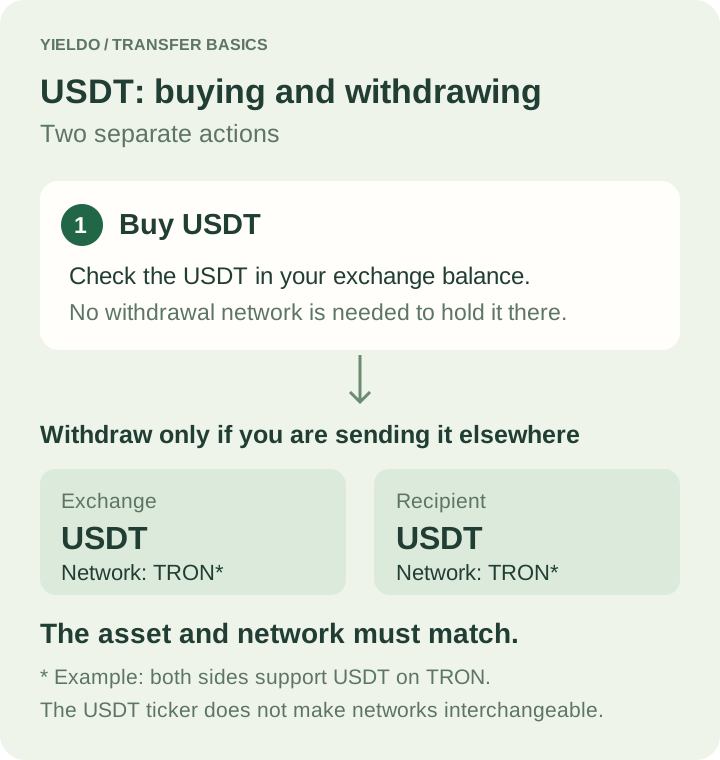
To send USDT to another wallet or exchange, first open the recipient's USDT receive/deposit screen. Identify a network supported at both ends and copy the receiving address. Then use Assets → Overview → Withdraw → Withdraw Asset on Binance, select USDT, enter the address and select that same network.
Review the withdrawal fee, minimum and final amount received before confirming. Do not choose a cheaper network that the recipient does not support. You can compare the tracked Binance USDT withdrawal fees and network status on Yieldo, then confirm the available route and final charge on Binance. These withdrawal figures do not measure your card, P2P or Convert purchase cost.
USDT on TRON is still USDT, not TRX. In a self-custody wallet, sending it later may require TRON resources or TRX to cover missing resources. Similarly, USDT on Solana does not supply the SOL used for that network's fees. The asset and network distinctions follow Tether's supported protocols, TRON's resource model and Solana's fee explanation.
If a completed P2P purchase cannot yet be withdrawn, check for an account hold. Binance applies T+1 or T+2 withdrawal restrictions in certain circumstances; a visible balance does not always mean it is immediately withdrawable. For an external transfer, completion means the recipient has received the correct USDT asset on the selected network, not merely that Binance accepted a withdrawal request.