In Meteora DLMM, you choose the prices at which your assets are available for swaps. If swaps take SOL/USDC through your entire range, you end up in USDC on the way up or SOL on the way down. You stop earning fees outside the range. On withdrawal, you get the position’s current assets and can collect fees separately.
 Eugen Voyager

Contents
How to choose a SOL/USDC pool
A A shared reserve of assets held in a smart contract. It is used for swaps or settlement between participants; its purpose and rules are set by the application. holds assets that traders swap through Meteora. A DLMM pool splits prices into levels called bins. Swaps use the active bin’s price until the desired token runs out, then move to the next bin with liquidity.
A pair can have several pools. Find SOL/USDC in the Meteora app, check each The address of a Solana record identifying a particular token and storing its total supply and authorities. All units of that token share this address. Wallets and explorers may label it mint. under Token Info, and compare Bin Step (price gap) and Base Fee (minimum swap fee). In one SOL/USDC pool, adjacent prices are 0.04% apart and the base fee is 0.04%. In another pool for the same pair, the bin step is 0.80% and the base fee is 0.25%. The same number of bins covers a wider price range in the second pool. Swap fees can rise when prices move rapidly. The protocol gets a cut. Liquidity providers earn their share where the swap uses their assets.
How to set a range and open a position
You need a Solana wallet and SOL for network fees. Meteora’s terms restrict access for citizens and residents of the US and other listed territories.
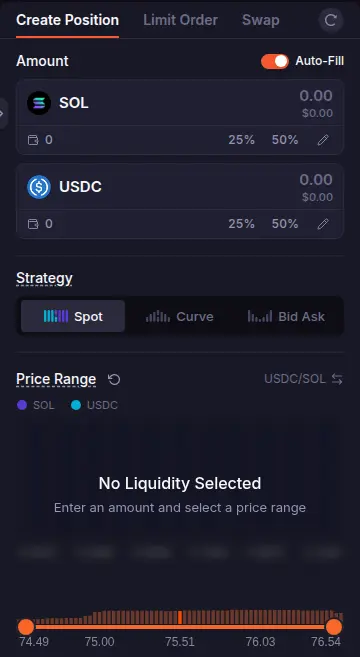
- Connect your Solana wallet to the pool you chose and select Create Position. Enter your SOL and USDC amounts. With Auto-Fill on, the app estimates the amount of the second token. To deposit one token, turn off Auto-Fill. You can place SOL above the current price to sell it gradually for USDC, or place USDC below the current price to buy SOL.
- Set Min Price and Max Price in USDC per SOL. A narrower range can concentrate more liquidity at each price, but the pool price can leave it sooner.
- Choose a shape. Spot spreads liquidity evenly, Curve concentrates it near the active price on a centered range, and Bid Ask favors the edges. Check the distribution on the chart.
- Open View Details to review the costs in SOL. You recover the SOL reserved for the position account when you close it. The network fee and any cost of creating new groups of bins are expenses. Select Add Liquidity, confirm in your wallet, and look under Positions. If the price moves and the transaction fails, check the new pool price, range and amounts before retrying.
How to collect fees and withdraw your assets
A single-sided position above or below the current pool price starts earning fees when swaps use its bins. Your Liquidity shows the current value of the assets in the position. Claimable Fees shows fees you can collect separately. When the price leaves your range, the fees you already earned remain available. After a price drop, the position can end up in SOL and be worth less in USDC than your initial deposit, even with fees. Compare the result with the value of the original tokens if you’d kept them in your wallet.
Open the position you want to manage. To collect fees only, use the claim action for that position. Remove Liquidity lets you withdraw some or all of the liquidity. Withdraw and Close closes the position and returns the SOL reserved for its account. Check the SOL and USDC amounts before signing. After a full exit, check your wallet balances and confirm that the closed position has disappeared from the list of open positions.
Meteora’s DLMM instructions show how to set a range and manage a position. For how DLMM compares with the protocol’s other products, see our Meteora guide.
EV
Eugen Voyager
Crypto analyst and blockchain developer. In the industry since 2018. Creator of Telochain blockchain, GameFi project Telomeme, and Yieldo platform. Author of Telegram channel @tonsdot.
How we collect and check data — Yieldo's methodology.
How we publish, date and correct material — editorial policy.