To buy TRON's native coin on Binance, select TRX as the asset you receive. Use an available direct payment method, exchange crypto through Convert, or place a Buy TRX order on an eligible Spot pair. Verify the completed purchase and the quantity of TRX in your balance.
If you need TRX to cover a transaction in an external TRON wallet, buying it on Binance is only the first step. You must also withdraw TRX over the TRON network to that wallet. Buying USDT and selecting TRON for its withdrawal sends USDT; it does not create a TRX balance.
TRX and USDT on TRON are different assets
TRX is TRON's native coin. USDT on TRON, often called USDT TRC20, is Tether's token on that network. TRON names the network; TRC20 is the token standard. The network and the asset are separate choices. Tether's supported protocols, Binance's TRX guide.
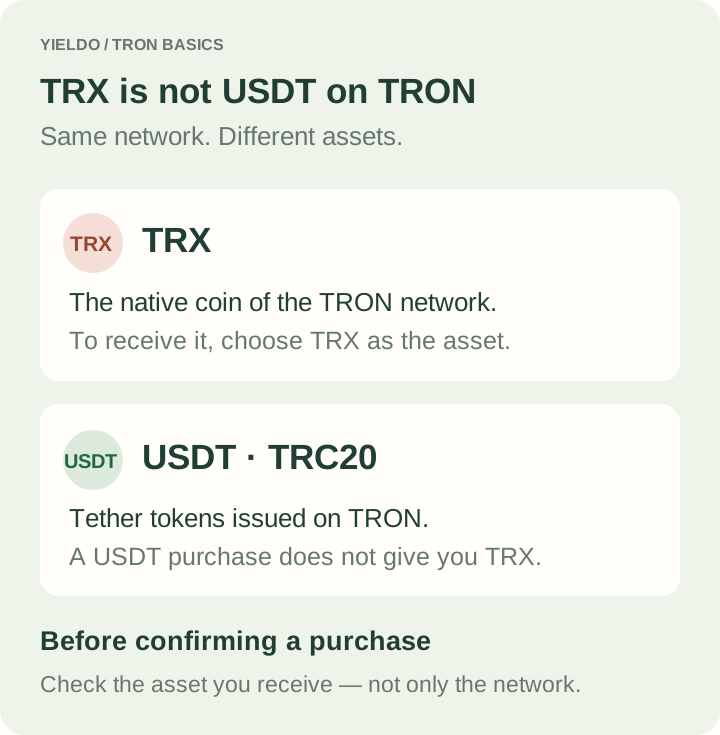
Diagram: choosing the TRON network does not change USDT into TRX.
TRON transactions consume Bandwidth, and smart-contract operations also use Energy. When the required resources are insufficient, TRX may be burned to cover costs. Resources can also come from staking or delegation, so there is no universal rule that every USDT transfer requires buying a fixed number of TRX. Use the sending wallet's current resource and fee estimate to determine what is missing. TRON resource model.
Start with an available purchase route
This guide covers Binance.com, subject to your account's regional access. It does not establish the same services or screens for Binance.US. Complete the requested verification in Account → Identification before Periodic payments between buyers and sellers of perpetual futures. Buyers pay when the rate is positive; sellers pay when it is negative. This mechanism keeps the contract price closer to the underlying asset price. the account. Identity verification.
| What you can use | Route |
|---|---|
| A supported card | Buy Crypto → TRX → available card option |
| A supported bank deposit | Deposit fiat, then select an available purchase or exchange into TRX |
| Crypto already held on Binance | Convert to TRX or use a matching Spot pair |
| A local P2P payment method | Buy an available intermediate asset, then exchange it for TRX |
Do not buy an intermediate coin before checking that your account can exchange it for TRX. Public Binance markets include TRX/USDT and TRX/USDC, but personal access can differ. EEA users cannot use the restricted USDT Spot pairs; check an eligible alternative such as TRX/USDC where available. Binance stablecoin restrictions.
Buy TRX directly with a card or fiat balance
On the website, open Buy Crypto, choose the payment currency, TRX, and your spending amount. Select a supported card option, add your own card if necessary, then review the charge, any fees and the TRX receivable. Confirm only after checking the current quote and complete the bank's authorization if requested.
After processing, check History → Fiat Order or Buy & Sell → Orders, then find TRX in Assets → Overview and Spot. A pending or failed order is not a completed purchase, even if your bank shows a debit. Open that order's error details or inquiry option before making another payment. Binance card purchase instructions.
For a bank deposit, Deposit → Bank Deposit shows the available currencies and methods. Follow the recipient and reference details in the new deposit instruction. Once the fiat arrives, make the supported purchase into TRX. Depositing money alone does not buy TRX, and the deposit channel's limit is not necessarily the purchase minimum. Binance deposit guide.
Convert an existing balance into TRX
For a single exchange, open Trade → Convert & Block Trade → Instant. Set From to your available asset and To to TRX, enter the amount, and select Preview Conversion. Review the TRX you will receive, then confirm before the quote expires.
Check Orders → Convert History and your actual TRX balance. Do not choose Recurring unless you intend to schedule repeated purchases. Convert uses its own quote, which can differ from Spot; compare the final TRX amount for the same input rather than assuming the absence of an additional trading fee makes every quote cheaper. Binance Convert FAQ.
Under Binance's Funding-to-Spot migration, one-time Convert settlement moves to Spot. The rollout began on 29 September 2026, so verify the destination shown in the completed order instead of following an older instruction that assumes Funding for every account. Migration FAQ.
Buy TRX on Spot
If your spending asset is available in Spot:
- Open Trade → Spot and select an eligible pair matching your balance, such as TRX/USDC or TRX/USDT.
- Choose the Buy side of the Spot form. Do not switch to Cross or Isolated Margin for a purchase using your own funds.
- Choose Market to trade against available orders, or Limit to set a purchase price. Check whether the field expects your spending Total or the Amount of TRX.
- Enter the amount and, for a Limit order, the purchase Price. Check the form's current minimum and your available balance, review the order, then select Buy TRX and complete any confirmation.
- Verify the executed quantity and fee in Trade History, then check TRX in Spot. If a Limit order is still open, the unfilled quantity has not been bought.
A Market order does not fix the final price at the last price you saw. A Limit order controls the acceptable price but may not execute. If only part of an order filled, inspect the remainder before placing another order for the full original budget. Spot instructions, order types.
If P2P is your way to fund the purchase
Direct TRX P2P offers should not be assumed in every fiat market. After checking a valid final route to TRX, open Trade → P2P → Buy and choose the intermediate asset, fiat currency and payment method. Create a suitable order, pay its exact amount using the order's recipient details, then select Transferred, Notify Seller. Wait for release and select View my balance. P2P purchase instructions.
Use your own verified-name payment account; the recipient must match the seller's verified name. Do not send money to a third party or move the transaction into a messenger. Check the fee shown for the market and any separate payment charge: P2P is not universally free. P2P policy, P2P fee schedule.
After release, inspect Assets → Overview and Spot. If the funds are still in Funding during the migration, use Transfer → Funding to Spot, select the asset and amount, then confirm. Skip this step when the asset is already in Spot. This is an internal transfer, with no blockchain address to enter. Balance and transfer instructions.
If you have paid but the asset has not been released, use the original order's chat and appeal process with proof of payment. Do not cancel an already paid order before an actual refund.
Withdraw TRX to the wallet that needs it
Open your receiving wallet and copy its TRON receiving address. On Binance's website, go to Assets → Overview → Withdraw → Withdraw Asset:
- Choose TRX as the asset.
- Enter your receiving address and select the compatible TRON network.
- Enter the amount. Check the minimum, withdrawal fee and final amount the wallet will receive.
- Confirm the details and complete the required security checks.
- Follow Orders → Transaction History, then verify the TRX balance in the receiving wallet.
Read the amount labels carefully: the form may add the fee to a chosen recipient amount or deduct it from a total withdrawal amount. A submitted request is not proof that the wallet has received the transfer. For a new address, a small test can help verify the destination, provided it meets the minimum and accounts for the fee. Binance withdrawal guide.
The TRX withdrawal fee page for Binance in Yieldo can help you check the withdrawal cost. Confirm current availability and the recipient amount in Binance before submitting. A cheap fee does not make an incompatible network suitable.
How much TRX is enough for the next transaction?
There are three separate costs: buying TRX, withdrawing it from Binance, and the later operation in your TRON wallet. Do not use the exchange withdrawal fee as an estimate of what a USDT transfer will consume.
Before choosing how much TRX to buy for fees, open the planned transaction in your wallet and inspect its resource and fee estimate. Account for the TRX that will actually arrive after withdrawal, your existing TRX balance and any available resources. A TRX top-up stays on Binance until you withdraw it; it cannot cover fees in a separate wallet while it remains on the exchange.
Once TRX arrives, refresh the wallet's balance and estimate before sending USDT or interacting with a contract. If it still reports insufficient resources or TRX, investigate that message rather than repeatedly submitting or relying on a fixed “10 TRX is enough” rule. Bandwidth, Energy and the transaction being executed determine the requirement. TRON Bandwidth and Energy.
Also check for any Binance withdrawal hold after P2P. Some situations temporarily restrict external withdrawals even while trading remains possible; exchanging the funds into TRX does not establish that the hold has ended. Follow the message and available amount in your account. P2P withdrawal restrictions.